Free PNG to GIF converter
Convert PNG to GIF
Combine a set of PNG images into an animated GIF, or turn an animated PNG into a GIF that plays in more places. You choose the timing, size, and background, and everything runs on your device.
Updated
Drop PNG images to make a GIF
Animated GIF, WEBP, or PNG up to 20MB · every frame keeps its own timing · up to 150 frames
or paste with Ctrl/⌘ + V
How it works
How to convert PNG to GIF
- 1
Add the PNG files
Select or drop all the PNGs at once. They're put in order by file name, so frame-2 comes before frame-10.
- 2
Set timing and size
On the Motion tab, set how long each image stays on screen. On the Canvas tab, choose the width and how images of another shape fit.
- 3
Create the GIF
Click Create GIF, check the preview and file size, and download.
PNG vs GIF
What changes when a PNG becomes a GIF
PNG and GIF are both lossless image formats, but PNG can hold far more: millions of colors and smooth transparency. A GIF frame has at most 256 colors, and each pixel is either fully transparent or fully solid. Here is how they compare:
| PNG / APNG | GIF | |
|---|---|---|
| Colors | Millions (24-bit) | Up to 256 per frame |
| Transparency | Smooth: 256 levels per pixel | On or off per pixel |
| Animation | APNG, an extension of PNG | Built in |
| Compression | Lossless | Lossless, after reducing to 256 colors |
| Our 24-frame test clip | 7,272 KB as APNG | 2,107 KB at 256 colors |
| Where it animates | Current browsers; elsewhere it varies | Nearly everywhere images work |
The APNG in our test was 3.5 times the size of the GIF of the same 24 frames, because it keeps every color exactly. GIF is smaller here, but it gets there by dropping colors, which is why screenshots and illustrations convert better than photos.
Transparency
Keeping transparency clean
Transparent PNGs, such as logos, stickers, and cut-out products, are the hardest case. Every pixel along a soft edge is partly see-through, and GIF can't store that. EasyGIF makes pixels that are at least half opaque solid and the rest transparent. On a white page the result usually looks fine; on a dark page, the pale pixels at the edge show as a fringe.
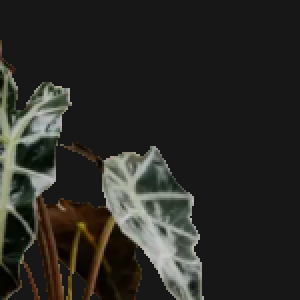 Transparent
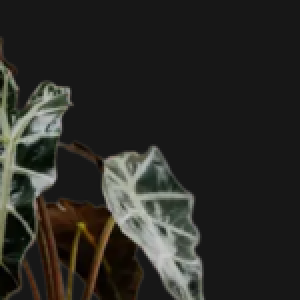 Background color
If the GIF will always sit on one background, choose that color instead of Transparent. If it has to work anywhere, keep it transparent and give the artwork a solid outline. The transparent GIF guide explains both.
Frames
Turning a set of PNGs into an animation
Order
Files are sorted by name with numbers read as numbers, so exports named frame-1.png to frame-24.png come in the right order even without leading zeros. You can drag frames on the timeline to change the order.
Timing
Still images have no delay of their own. Set one on the Motion tab: around 100 ms per frame for exported animation frames, or a second or more for a slideshow of screenshots. Longer delays don't make the file larger.
Different sizes
The GIF takes its shape from the first image. Images of another shape are fitted with background bars, filled and cropped, or stretched, as set under Images of another shape on the Canvas tab.
WebP images work the same way, including animated WebP, which the WebP to GIF converter covers. For photos rather than graphics, start from the GIF creator.
Troubleshooting
When a PNG to GIF conversion goes wrong
The transparent background turned white
Why: Still images are placed on the background color from the Style tab, which starts as white. Only an animated file that already has transparency switches it automatically.
- Open the Style tab and choose Transparent as the background.
- Or pick the color of the page the GIF will sit on, for smoother edges.
- Create the GIF again and check it on a dark and a light background.
An animated PNG came in as one image
Why: Reading each frame of an APNG needs the browser's ImageDecoder feature, which Safari doesn't have yet. Safari adds the APNG as a still image.
- Open this page in Chrome, Edge, or Firefox.
- Or export the APNG's frames as separate PNG files and add those.
- Check the number of frames on the timeline before creating the GIF.
The frames are in the wrong order
Why: Files are ordered by name, with numbers compared as numbers. Names without numbers, or with different prefixes, can sort differently from the order you meant.
- Rename the files with a shared prefix and a number: shot-1.png, shot-2.png, and so on.
- Or drag frames on the timeline into the right order.
- If you added files in several batches, use Sort by name to order them all again.
Edges have stair-steps or a halo
Why: A PNG's soft edges have partly transparent pixels. GIF has to make each one fully solid or fully clear, so curves turn jagged and pale edge pixels can show on dark pages.
- If you know the background the GIF will sit on, use that color instead of Transparent.
- For stickers that need real transparency, give the artwork a thin solid outline.
- The transparent GIF guide compares both approaches side by side.
Method
How we measured
The APNG and GIF sizes come from the same 24 frames, a slow pan across a Pexels portrait at 480 × 270 px. The APNG was written losslessly by ffmpeg; the GIF by EasyGIF's own encoder with 256 colors and dithering. The edge images are a real cut-out plant on a #171717 background, made both ways with the same 50% cut-off EasyGIF uses.
FAQ
PNG to GIF FAQ
- How do I make a GIF from PNG images?
- Add all the PNG files to the converter above at once. They become frames in file-name order. Set the delay on the Motion tab, click Create GIF, and download it.
- Does PNG to GIF keep transparency?
- Yes, if you choose Transparent as the background on the Style tab. GIF transparency is on or off per pixel, so soft edges become hard; a solid background color avoids that.
- Can I convert an animated PNG (APNG) to GIF?
- Yes, in Chrome, Edge, and Firefox: each frame is added with its own delay. Safari adds only the first frame.
- How many PNG files can I use?
- Up to 150 frames on a computer and 60 on a phone. Each PNG can be up to 20 MB.
- Are my PNG files uploaded?
- No. The images are read and the GIF is made in your browser. Nothing leaves your device.
PNG to GIF: go deeper
All guides →- File size & qualityHow to make a transparent GIF without jagged edgesGIF transparency is all-or-nothing per pixel, so soft edges turn jagged or leave a halo. Why it happens, and how matching the background color fixes it.
- File size & qualityGIF dithering explained: when it helps and when it just adds sizeDithering hides color banding in photos but fills flat graphics with noise. Side-by-side crops and measured file sizes show when to turn it on or off.
- File size & qualityHow to make a GIF smaller: what each setting actually savesWe encoded the same clip dozens of ways and measured the file each time. Width and frame count matter most; colors and dithering come next; frame delay saves nothing.
More GIF tools
- GIF Creator →Turn photos, screenshots, or an existing GIF into an animated GIF.
- Video to GIF →Any clip from your phone, camera, or screen recorder, trimmed to the moment you want.
- MP4 to GIF →Convert an MP4 file to an animated GIF, with control over size, frame rate, and file size.
- GIF Editor →Open a GIF you already have to crop, trim, resize, speed up, reverse, or caption it.
One job at a time: GIF Compressor · GIF Resizer · GIF Cropper · WebP to GIF · iPhone Video to GIF